
 By
By With dd you can easily copy disks, partitions and also optical disks (CDs or DVDs) and create a local backup. But what can you do, if dd runs into problems?

Creating a local ISO backup from your optical DVD drive
One easy and fast way to create a full local ISO backup of your optical disk is the following command using dd:
ck@mint ~ $ isoinfo -d -i /dev/cdrom | grep -i -E 'block size|volume size'
Logical block size is: 2048
Volume size is: 1521176

ck@mint ~ $ dd if=/dev/cdrom of=/tmp/dvd.iso bs=2048 count=1521176 status=progress
Or, as a one-liner that combines reading the logical block and the volume size:
ck@mint ~ $ dd if=/dev/cdrom of=/tmp/dvd.iso bs=$(isoinfo -d -i /dev/cdrom | grep -i "block size" | awk '{print $NF}') count=$(isoinfo -d -i /dev/cdrom | grep -i "volume size" | awk '{print $NF}') status=progressNote: Only do this once you verified isoinfo gives you the relevant information and numbers!
But optical disks can have scratches or dirt on the surface that makes reading it hard. CDs and DVDs also deteriorate with age. When dd runs into problems reading sectors, it fails with an i/o error:
ck@mint ~ $ dd if=/dev/cdrom of=/tmp/dvd.iso bs=$(isoinfo -d -i /dev/cdrom | grep -i "block size" | awk '{print $NF}') count=$(isoinfo -d -i /dev/cdrom | grep -i "volume size" | awk '{print $NF}') status=progress
100538368 bytes (101 MB, 96 MiB) copied, 42 s, 2.4 MB/s
dd: error reading '/dev/cdrom': Input/output error
49136+0 records in
49136+0 records out
100630528 bytes (101 MB, 96 MiB) copied, 42.0554 s, 2.4 MB/s
Luckily not all hope is lost yet.
ddrescue to the rescue!
A command with a similar name, ddrescue, can often help in such situations. Although "dd" also appears in ddrescue, dd is not used in the background. ddrescue is entirely its own program and is not dependent on dd.
ddrescue is an open source GNU project and therefore available as package in most Linux distributions.
To install ddrescue on Debian, Ubuntu and other Linux distributions using the APT package manager:
ck@mint ~ $ sudo apt install gddrescueOn Fedora, Red Hat, Rocky Linux, AlmaLinux and other Linux distributions using the YUM/DNF package manager:
ck@rocky ~ $ sudo dnf install ddrescueYou can now launch ddrescue in the Terminal:
ck@mint ~ $ ddrescue -b 2048 /dev/cdrom /tmp/dvd4.iso /tmp/dvd.logHere we use the same block size (-b) as obtained from the isoinfo command before.
When ddrescue reached the ~100MB of the DVD, where dd ran into i/o errors, the counter of read errors started to increase:
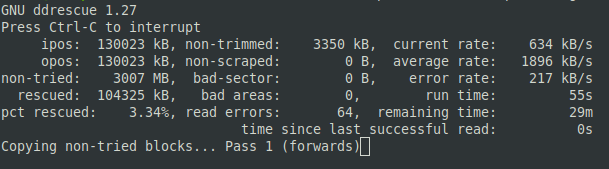
However ddrescue continues its work. Although there was read errors, ddrescue was able to rescue 100% of the DVD:
Copying non-tried blocks... Pass 2 (backwards)
     ipos:  491517 kB, non-trimmed:        0 B,  current rate:    149 kB/s
     opos:  491517 kB, non-scraped:        0 B,  average rate:   2198 kB/s
non-tried:        0 B,  bad-sector:        0 B,    error rate:       0 B/s
  rescued:    3122 MB,   bad areas:        0,        run time:     23m 39s
pct rescued:  100.00%, read errors:     1683,  remaining time:          0s
                              time since last successful read:         n/a
Trimming failed blocks... (forwards)
Finished
ddrescue can continue later
ddrescue is able to continue the backup process after cancelling it – as long as you use the same destination file name and log file. In the following example. ddrescue was running but was interrupted with [CTRL]+[C]:
ck@mint ~ $ ddrescue /dev/cdrom /tmp/dvd.iso /tmp/dvd.log
Trimming failed blocks... (forwards)
     ipos:  108781 kB, non-trimmed:        0 B,  current rate:       0 B/s
     opos:  108781 kB, non-scraped:    1342 MB,  average rate:    223 kB/s
non-tried:        0 B,  bad-sector:   11056 kB,    error rate:    3584 B/s
  rescued:    1761 MB,   bad areas:    13784,        run time:  2h 11m 25s
pct rescued:   56.53%, read errors:    48717,  remaining time:         n/a
                              time since last successful read:      2m 53s
Scraping failed blocks... (forwards)^C
  Interrupted by user
The ddrescue command was then launched again, with the additional parameter -r1 (retry 1x). ddrescue picked it up again where it was last working on:
ck@mint ~ $ ddrescue -r1 /dev/cdrom /tmp/dvd.iso /tmp/dvd.log
GNU ddrescue 1.27
Press Ctrl-C to interrupt
Initial status (read from mapfile)
rescued: 1761 MB, tried: 1353 MB, bad-sector: 11056 kB, bad areas: 13784

Current status
     ipos:  186479 kB, non-trimmed:        0 B,  current rate:       0 B/s
     opos:  186479 kB, non-scraped:    1308 MB,  average rate:      23 B/s
non-tried:        0 B,  bad-sector:   44915 kB,    error rate:    8704 B/s
  rescued:    1761 MB,   bad areas:    13612,        run time:  1h  3m 12s
pct rescued:   56.54%, read errors:    66132,  remaining time:         n/a
                              time since last successful read:      1h 28s
Scraping failed blocks... (forwards)
When even ddrescue can't help anymore
However depending on the optical disk's surface and how good or bad in shape it is, even ddrescue might not always work. In the following example, ddrescue was only successful to rescue 56% as the disc simply has too many bad areas/sectors:
Trimming failed blocks... (forwards)
     ipos:  437661 kB, non-trimmed:        0 B,  current rate:       0 B/s
     opos:  437661 kB, non-scraped:    1184 MB,  average rate:    138 kB/s
non-tried:        0 B,  bad-sector:  170833 kB,    error rate:   26624 B/s
  rescued:    1760 MB,   bad areas:    13083,        run time:  3h 31m 22s
pct rescued:   56.50%, read errors:   110568,  remaining time:         n/a
                              time since last successful read:  1h 23m 37s
Scraping failed blocks... (forwards)
Patience pays off (sometimes)
The previous attempt remained stuck forever. After stopping the process and re-run ddrescue with the -r1 parameter (only retry one time on bad sectors), ddrescue was still stuck on the 56.63% mark… UNTIL it finally passed all the defect sectors (bad areas) and continued on.
Trimming failed blocks... (forwards)
     ipos:  108781 kB, non-trimmed:        0 B,  current rate:       0 B/s
     opos:  108781 kB, non-scraped:    1342 MB,  average rate:    223 kB/s
non-tried:        0 B,  bad-sector:   11056 kB,    error rate:    3584 B/s
  rescued:    1761 MB,   bad areas:    13784,        run time:  2h 11m 25s
pct rescued:   56.53%, read errors:    48717,  remaining time:         n/a
                              time since last successful read:      2m 53s
Scraping failed blocks... (forwards)^C
  Interrupted by user

ck@mint ~ $ ddrescue -r1 /dev/cdrom /tmp/dvd.iso /tmp/dvd.log
GNU ddrescue 1.27
Press Ctrl-C to interrupt
Initial status (read from mapfile)
rescued: 1761 MB, tried: 1353 MB, bad-sector: 11056 kB, bad areas: 13784

Current status
     ipos:    3114 MB, non-trimmed:        0 B,  current rate:   2517 kB/s
     opos:    3114 MB, non-scraped:        0 B,  average rate:    109 kB/s
non-tried:        0 B,  bad-sector:  107096 kB,    error rate:       0 B/s
  rescued:    3007 MB,   bad areas:    13294,        run time:  3h  9m 46s
pct rescued:   96.56%, read errors:   187578,  remaining time:         47s
                              time since last successful read:          0s
Scraping failed blocks... (forwards)
     ipos:    3114 MB, non-trimmed:        0 B,  current rate:    232 kB/s
     opos:    3114 MB, non-scraped:        0 B,  average rate:    118 kB/s
non-tried:        0 B,  bad-sector:        0 B,    error rate:       0 B/s
  rescued:    3114 MB,   bad areas:        0,        run time:  3h 10m 54s
pct rescued:  100.00%, read errors:   187578,  remaining time:          0s
                              time since last successful read:         n/a
Retrying bad sectors... Retry 1 (forwards)
Finished
In total this took over 3 hours and was stuck around 1 hour around the bad areas – but was at the end successful. The video DVD could be saved successfully as ISO file.
Advise: Digitize your DVDs
As mentioned before, optical disks (CDs and DVDs) deteriorate with age. You can extend their "lifetime" by storing them in proper cases, away from light. But even then, the ageing process runs.
If you have data, such as pictures or backups, somewhere stored on CDs or DVDs, do not wait much longer. Digitize the DVDs! The same obviously also goes for your movies or TV shows collection on DVDs.


