
 By
By 
AI has evolved so fast, it's hard to keep track of all the amazing (and sometimes horrifying) stuff that can be done. I recently came across a fantastic way to use my own voice to read aloud (text2speech) some defined text.
Voice Recording (Sampling)
First you need to record your own voice. You could read something, or just talk straight away what comes into your mind. The recording should ideally be 10s – 30s long. The more tones and pronunciations you make, the better the AI will interpret your voice in the final result.
To record your voice there are a couple of options. One widely used and open source software is Audacity. Simply use the [Audio Setup] button to select your [Recording Device] and click the red record button.
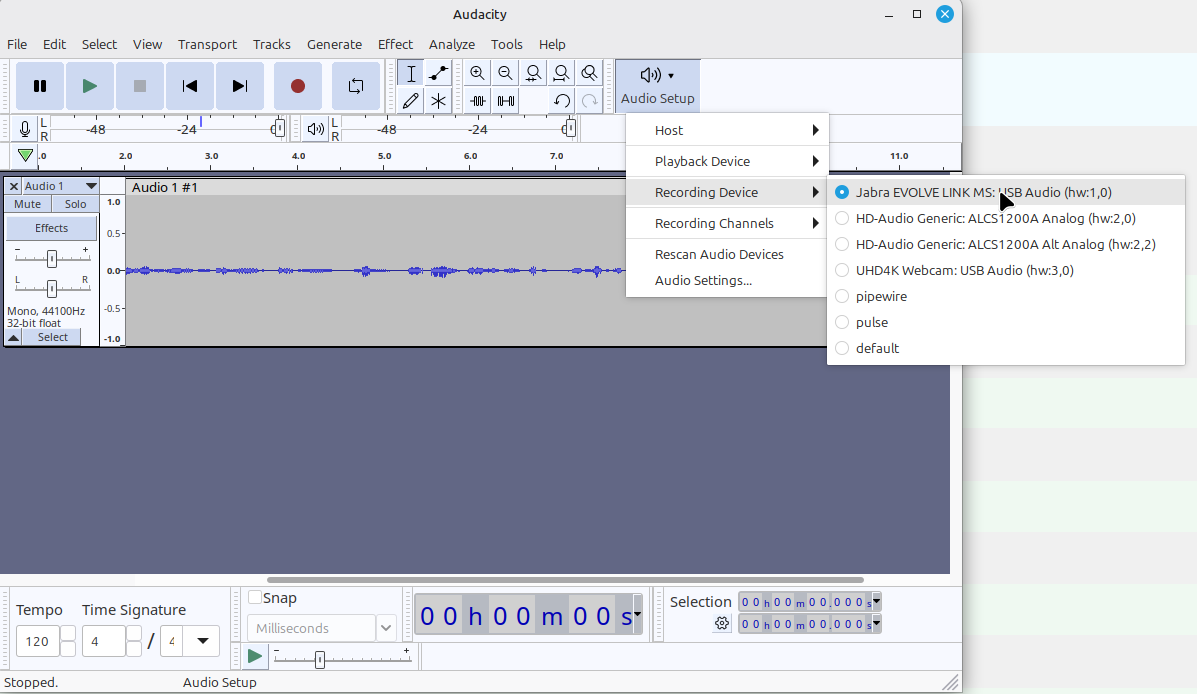
Once recorded, export your voice as mp3 file. I saved this as /tmp/my-voice.mp3.
Voice cloning API from Venice AI
There are many AI providers and even more AI models that could be used for the task, but here we focus on the Venice AI API. All you need is a subscription from Venice AI and an API key and you're ready to go.
ck@linux /tmp $ export VENICE_API_KEY=VENICE_INFERENCE_KEY__xxxxxxxxxxxxxxxxxxxxxxxxxxxxxxxxxxxxxNow we can use curl to upload your voice sample to the audio/voices API. The response will contain an ID starting with vv_. This will be the unique ID of your voice sample.
ck@linux /tmp $ curl https://api.venice.ai/api/v1/audio/voices -H "Authorization: Bearer $VENICE_API_KEY" -F "model=tts-chatterbox-hd" -F "[email protected]"
{"id":"vv_aHR0cHM6Ly92M2Ixxxxxxxxxxxxxxxxxxxxx...","model":"tts-chatterbox-hd"}
Now that you have the ID of your voice, you can send a new curl request referring to the ID of your voice and also the text you want to use as text2speech:
ck@linux /tmp $ curl https://api.venice.ai/api/v1/audio/speech -H "Authorization: Bearer $VENICE_API_KEY" -H "Content-Type: application/json" -d '{ "model": "tts-chatterbox-hd", "voice": "vv_aHR0cHM6Ly92M2Ixxxxxxxxxxxxxxxxxxxxx...", "input": "This is me, but its actually not. It is just my voice, totally AI generated. Awesome? Scary?" }' --output aivoiced.wav
  % Total    % Received % Xferd  Average Speed   Time    Time     Time  Current
                                 Dload  Upload   Total   Spent    Left  Speed
100 1335k  100 1335k  100   273   6833      1  0:04:33  0:03:20  0:01:13  331k
As you can see from the curl output above, it took a bit more than 4 minutes to create an audio file (aivoiced.wav) which can now be found in your current directory (/tmp in this situation).
Play it and be stunned! I have to admit, it's REALLY close to my real voice. It's very difficult to distinguish, especially if you hear the audio only.
Are you still sending Whatsapp voice messages now? Think twice…
Get $10 if you sign up for Venice AI Pro
Looks amazing? Even better: You can get $10 when you sign up for Pro on Venice AI.


